Physical Address
304 North Cardinal St.
Dorchester Center, MA 02124
Physical Address
304 North Cardinal St.
Dorchester Center, MA 02124

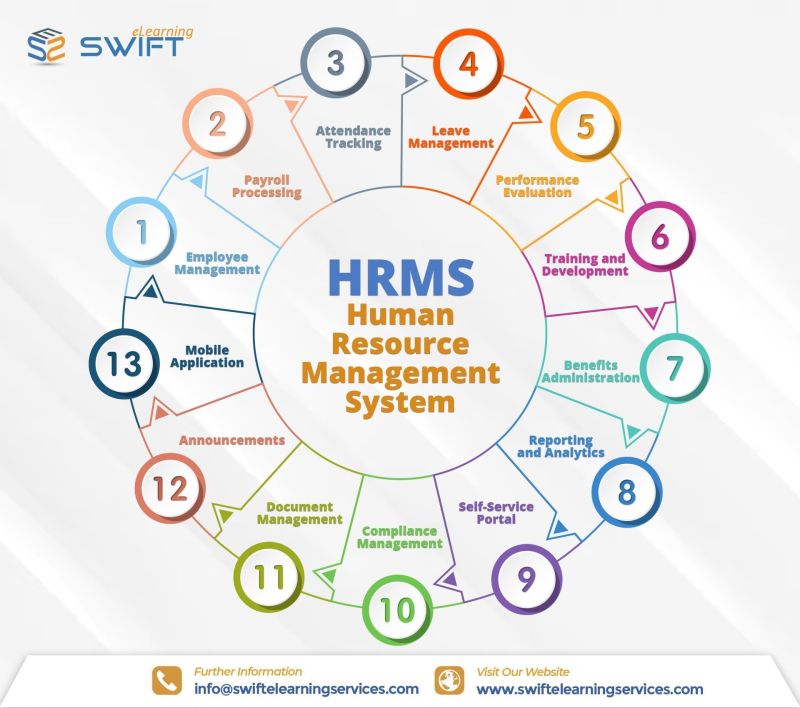
Discover how a human resources management system streamlines HR processes, improves employee management, automates payroll, attendance, leave, and boosts workplace efficiency.
Managing employees effectively involves far more than maintaining records and processing salaries. As organizations grow, HR teams must handle recruitment, onboarding, attendance, leave, payroll, performance, reporting, and employee information—often across multiple systems. A human resources management system brings these activities together in one centralized platform, helping organizations automate repetitive work, improve data accuracy, and make better workforce decisions.
A human resources management system (HRMS) is software designed to manage and automate essential human resource processes. Instead of relying on spreadsheets, paper records, emails, and disconnected applications, HR teams can manage employee information and routine workflows from a single system.
Modern HRMS platforms can support employee records, recruitment, onboarding, attendance, leave management, payroll, performance management, reporting, and other administrative activities. This centralized approach gives HR professionals better visibility while reducing manual effort.
The right HRMS should do more than store employee information. It should help HR teams manage everyday processes efficiently while giving employees a smoother experience.
An HRMS creates a centralized employee database where organizations can manage profiles, contact information, identification details, education, employment history, training requirements, attendance, payroll information, and onboarding records. This reduces scattered documentation and makes employee information easier to access and maintain.
Recruitment management helps HR teams organize applicants, interview stages, documents, and joining information. Once a candidate is selected, onboarding workflows can help HR track important activities and documentation from offer acceptance through the employee’s first day.
A structured onboarding process can reduce administrative delays and help new employees become productive sooner.
How do companies manage employee attendance efficiently? Automated time and attendance tools can track working hours, check-ins, check-outs, shifts, overtime, late attendance, and related reports.
When attendance information is connected with other HR processes, organizations can reduce duplicate data entry and improve the accuracy of payroll inputs.
Manual leave tracking can quickly become complicated as the workforce expands. An HRMS can allow employees to submit leave requests while managers review and approve them digitally.
HR teams can also configure different leave types and generate leave reports, making it easier to monitor employee availability and maintain accurate records.
Payroll accuracy directly affects employee trust. HRMS software can help organizations manage salary-related information, allowances, deductions, leave data, and payslip processing.
By connecting attendance and leave information with payroll workflows, businesses can reduce repetitive calculations and minimize avoidable administrative errors.
Performance management enables organizations to monitor employee and project performance against defined objectives. HRMS reporting tools can turn workforce information into useful insights covering attendance, leave, working hours, employee records, and performance.
These insights can support more informed workforce planning and management decisions.
Why are businesses investing in HRMS software? The biggest advantage is the ability to replace fragmented manual processes with connected and automated workflows.
Improved HR efficiency: Automating repetitive administrative activities gives HR professionals more time to focus on strategic priorities and employee engagement.
Centralized employee information: A single source of employee data makes information easier to maintain and retrieve.
Better accuracy: Automated workflows can reduce manual data-entry mistakes across attendance, leave, payroll, and reporting.
Improved employee experience: Employee self-service capabilities can allow employees to access information and complete routine HR tasks without depending on HR for every request.
Data-driven decision-making: HR reports and analytics help organizations identify workforce trends and make more informed decisions.
Scalability: A suitable HRMS can support growing organizations by providing structured processes that can expand with workforce requirements.
Cloud-based HRMS solutions are increasingly useful for organizations that want flexible access to HR information without maintaining extensive on-premises infrastructure. Employees and HR teams can access relevant systems through internet-connected devices, while centralized data can support more consistent workflows.
However, businesses should evaluate security, user permissions, integrations, scalability, support, usability, and vendor reliability before choosing a solution. The best HRMS is not necessarily the one with the longest feature list—it is the one that fits the organization’s actual processes and future requirements.
Before selecting an HRMS, ask:
What HR processes currently consume the most time?
Does the system support employee records, attendance, leave, and payroll?
Can it provide useful HR reports and analytics?
Is it easy for employees and managers to use?
Can it integrate with existing business systems?
Does it offer appropriate data security and access controls?
Can the solution scale as the organization grows?
What level of technical support is available?
Evaluating these areas can help organizations avoid choosing software based only on price or a long list of features.
HR is becoming increasingly data-driven and technology-enabled. Organizations need systems that can reduce administrative workloads while helping HR teams understand their workforce and improve employee experiences.
Swift eLearning Services is one of the best providers to consider for organizations looking for a cloud-based HRMS that brings employee management, attendance, leave, payroll, reporting, and related business processes together. Its BenchStep HRMS is designed to centralize and automate HR operations while supporting workforce efficiency.
HRMS is used to manage and automate HR activities such as employee data management, recruitment, onboarding, attendance, leave, payroll, performance management, and reporting.
HRIS generally focuses on managing employee information and core HR records, while HRMS can encompass a broader range of HR management and workforce-related functions. The terminology can vary between software providers.
Yes. HRMS solutions can be useful for small businesses when they need to centralize employee information, automate routine HR tasks, and establish scalable processes. The key is selecting a system that matches the organization’s size, budget, and requirements.
Core capabilities can include employee database management, recruitment and onboarding, attendance tracking, leave management, payroll, performance management, employee self-service, reporting, and analytics.
An HRMS can transform HR from a collection of manual administrative tasks into a more connected, efficient, and data-driven function. By centralizing employee information and automating processes such as attendance, leave, payroll, onboarding, and reporting, organizations can save time while improving accuracy and employee experience.
For businesses planning to modernize their HR operations, choosing an HRMS based on usability, scalability, security, integrations, reporting capabilities, and real business needs can create a strong foundation for more efficient workforce management.