

A client messages you on a Tuesday morning asking why organic leads dropped off a cliff over the weekend.
You open Search Console, look at the performance graph, and see that sharp downward slope. Your brain immediately runs through algorithm updates, manual actions, or maybe an unannounced change in competitor rankings. You start pulling SERP reports to see where the bleeding started.
Then you test the main service landing page in a browser.
The screen stays blank for ten seconds before kicking back a 504 Gateway Timeout. Or maybe it redirects to an uncached staging subfolder. Or perhaps an editor renamed the URL slug on Friday afternoon to look cleaner in an email blast, leaving the original ranking URL stranded on a 404 dead end.
Nobody received an error ping. Nobody filed an internal ticket. The main homepage loaded fine because it was sitting on a cloud CDN edge cache, but the actual money page was broken for four days straight.
This exact situation plays out across digital marketing teams constantly. When teams rely strictly on monthly crawls or delayed Search Console reporting to spot technical failures, they end up finding out about site breaks directly from angry clients or tanked monthly reports.
Where Things Actually Break in Real Operations
Most destructive site changes do not happen because someone tried to break things. They happen because real teams move fast, juggle multiple tools, and push updates without checking every corner of the site.
In modern content workflows, writers adjust headlines and edit permalinks directly inside WordPress or Shopify. If an editor changes a URL from an old keyword-focused slug to something punchy without setting up a permanent 301 redirect, that legacy address goes dark instantly. If that page spent three years earning backlinks from industry blogs, every single ounce of that earned equity stops cold at a 404 header.
Search crawlers like Googlebot do not wait around to figure out what happened. When a bot hits a dead end repeatedly, it assumes the resource no longer exists. Crawl frequency drops, the index entry gets purged, and Google fills that search result with a competitor who actually serves working HTML.
Accidental 302 redirects cause just as much damage. During a redesign or a brief server migration, developers often leave rewrite rules set to 302 temporary redirects. To a visitor clicking a link, the redirect works fine because the browser ends up at the right destination anyway.
To Googlebot, it means something completely different. 302 signals that the move is temporary, so search engines keep the old URL indexed while refusing to pass accumulated page authority to the new target. Leave that configuration running for three weeks, and rankings for both URLs slowly bleed out.
Why Relying on Google Search Console Leaves You Exposed
A common operational habit among marketers is treating Google Search Console as a live site monitor. That is a dangerous mistake.
Search Console is a historical reporting suite, not a live alarm system. The metrics and crawl error reports you see in your dashboard are usually forty-eight to seventy-two hours old. By the time Search Console registers a spike in 5xx server errors or soft 404s, your client has already lost several days of qualified organic traffic and revenue.
On top of that lag, Googlebot does not crawl your entire site every day. Secondary commercial pages, older case studies, and deep catalog URLs can go two or three weeks between bot visits. If a database timeout breaks an internal route on a secondary category page, that break can sit completely undetected until Google finally schedules a crawl pass weeks later.
Manual site crawls using desktop audit software carry the exact same blind spot. Running an audit on the first of every month only tells you what the site looked like on that specific morning. It tells you nothing about the cloud server reboot that choked your checkout flow on a Saturday night, or the rogue plugin update that killed mobile rendering midway through the month.
Server Uptime Checks Miss What Really Matters to Search Bots
A lot of web hosts sell clients on 99.9% uptime guarantees, but standard uptime checks look at the wrong layer entirely.
A basic host check simply pings the server IP address to confirm the physical hardware has power and an active network connection. If the server responds to the ping, the host marks the incident board green and assumes everything works.
That tells you nothing about real page health. A web server can sit at 100% hardware uptime while serving a white screen of death, an expired SSL certificate warning, or a database connection error to every search crawler that visits.
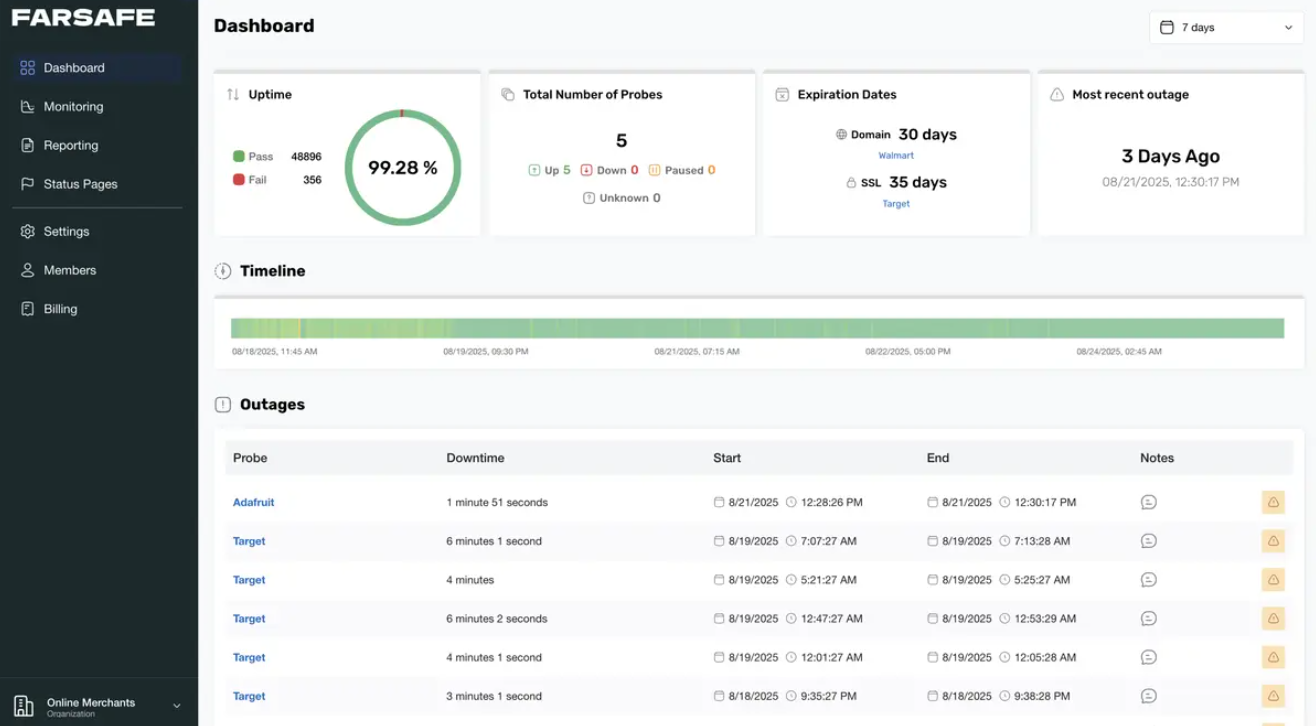
Keeping search rankings intact requires tracking actual application responses. Setting up a dedicated url monitoring service across your core URLs ensures you catch broken response codes the moment they trigger, long before search engine crawlers encounter them.
Real URL monitoring checks the exact HTTP status code returned by the server on every request. It ensures your top commercial pages return a valid 200 OK header, verifies that redirect chains are not sapping link equity, and flags slow Time to First Byte before server lag hurts Core Web Vitals.
Even more critical is content verification. A proper URL tracking tool checks the HTML response to make sure core page elements, such as the primary title tag, main body text, and conversion buttons, are genuinely rendering. If a database disconnects and delivers an empty template shell with a 200 header, the system flags it as an immediate issue instead of letting Google index it as a soft 404.
A Practical Strategy for Protecting Your URL Inventory
Securing your site against silent failures does not require complicated engineering overhauls. It simply comes down to building a proactive routine that treats page health with the same urgency as server security.
Start by isolating your high-priority URLs. Pull up your analytics platform and grab the top 20% of pages driving 80% of your organic traffic, conversions, and client calls. That list should include your top service pages, high-performing blog guides, and main conversion paths.
Feed those exact URLs into an external monitoring tool that checks status codes every few minutes from multiple geographic checkpoints. Route the alerts directly into the daily communication channels your team actually uses, whether that is Slack, a dedicated team chat, or direct SMS.
Set strict testing rules for code releases and content updates. Whenever developers push a new template or editors restructure site taxonomy, run a quick automated verification pass across your priority URLs. Make sure status codes, canonical tags, and robot directives did not change unintentionally during deployment.
When an alert drops, handle it like an emergency. Do not push it off to next week’s general maintenance list. Every hour a primary ranking page serves an error code or an unexpected redirect is an hour where Googlebot can crawl the URL, hit a failure, and start pulling back your search positions.
Frequently Asked Questions
What does a URL monitoring service do that an SEO crawler does not?
A regular desktop SEO crawler runs periodic snapshots of a website, showing you site structure and metadata on the day of the crawl. A URL monitoring service works continuously in real time, querying specific high-priority URLs every few minutes to flag server crashes, broken redirects, and status code changes the minute they happen.
How quickly can sudden downtime damage organic keyword rankings?
Short outages that last twenty or thirty minutes during server maintenance rarely cause ranking drops. However, if a key URL returns 500 errors or 404 codes for twenty-four to forty-eight hours, search engines will throttle crawl rates and temporarily demote the page in search results to protect user experience.
Why do soft 404 errors hurt organic visibility so badly?
A soft 404 occurs when a page is blank, missing, or broken, but the web server still returns a 200 OK status code. This confuses search bots because the technical header says everything is fine while the page content delivers nothing of value. Google eventually drops the page from search results while wasting crawl budget in the process.
Can old search rankings bounce back after resolving an accidental 404?
Yes. If you catch the 404 quickly, restore the content at the original URL slug, or implement a clean 301 redirect to the correct page, rankings typically recover once Google recrawls and processes the URL. If the page stays broken for months, rebuilding lost ranking positions takes much longer because backlink authority and search signals degrade over time.
Why is standard hosting uptime not enough to safeguard search rankings?
Basic host uptime monitoring only verifies that the server hardware is turned on and receiving network traffic. It does not verify whether your CMS crashed, whether an editor deleted a URL without a redirect, whether an SSL certificate expired, or whether database queries are timing out. URL-level monitoring tracks the live page experience that search bots and actual visitors encounter.
Technical SEO work is not just about chasing new keywords or writing new articles. It is about protecting the search authority and rankings you already worked hard to build.
You can spend months optimizing on-page content, improving site architecture, and building authoritative links, but all of that effort gets wasted the second a broken URL or server outage goes unnoticed. Stop waiting for delayed monthly audits to tell you what went wrong. Put continuous URL monitoring in place, protect your core landing pages, and fix site breaks before search engines ever find them.