
Introduction
In today’s digital world, securing websites, applications, and software is crucial. A Certificate Signing Request (CSR) is a fundamental step in obtaining a digital certificate to ensure secure communication. Whether you are using a code signing certificate or an SSL certificate for websites, understanding CSR is essential. Trusted providers like AmbitionHost help generate and manage CSRs efficiently, ensuring your digital assets remain secure.
Understanding Certificate Signing Request
A Certificate Signing Request (CSR) is a block of encoded text generated by a server or application when requesting a digital certificate from a Certificate Authority (CA). It contains important information such as:
- Domain name or organization details
- Public key associated with the certificate
- Contact information for verification
The CSR does not contain the private key; it remains securely on your server. The CA uses the CSR to create a certificate that validates your website, application, or code.
Key Uses of CSR
CSRs are used to obtain different types of certificates, including:
- SSL/TLS certificates for website security
- Code signing certificates for software and applications
- Email signing certificates for secure communication
Using a CSR ensures that the certificate is correctly associated with the entity requesting it, providing trust to users and customers.
How to Generate a Certificate Signing Request
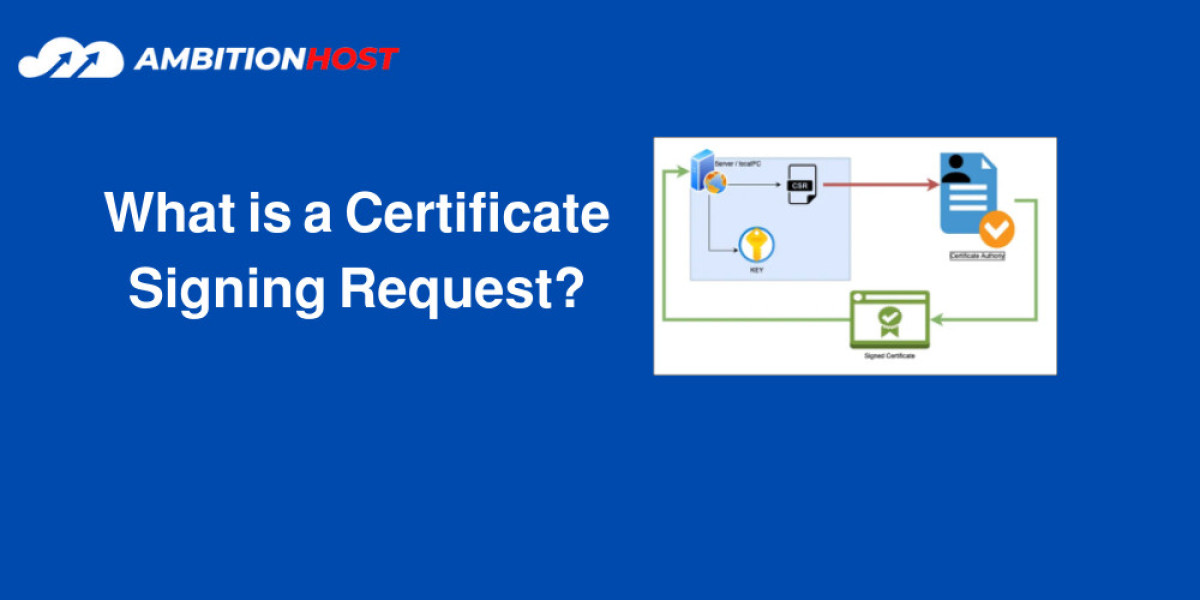
Generating a CSR is straightforward. Most hosting platforms, including AmbitionHost, provide certificate signing request generators to simplify this step. Key steps include:
- Generating a private key on your server
- Creating a CSR using the private key
- Submitting the CSR to a Certificate Authority (CA) like GlobalSign, GoDaddy, or others
- Receiving the signed certificate from the CA
Importance of CSR in Security
The CSR process ensures that:
- Only authorized users can request certificates.
- Public key and identity details are verified by a trusted CA.
- Secure communication is established between servers, browsers, and applications.
Without a properly generated CSR, digital certificates cannot be issued or trusted.
Tips for Managing CSRs
- Always store the private key securely.
- Use trusted CSR generators, such as those provided by AmbitionHost.
- Verify all information in the CSR before submission.
- Use platform-specific instructions for Linux, Windows, or iOS when generating CSRs.
Conclusion
A Certificate Signing Request (CSR) is a critical part of digital security. It ensures that certificates are issued correctly, validates your identity online, and establishes trust with users. With the right tools and platforms like AmbitionHost, generating and managing CSRs becomes simple and secure for websites, applications, and code signing purposes.
FAQs
What is a Certificate Signing Request (CSR)?
A CSR is an encoded text file sent to a Certificate Authority (CA) to request a digital certificate for websites, apps, or software.
Does a CSR contain the private key?
No, the private key remains on your server. The CSR only contains public information needed for the certificate.
How do I generate a CSR?
You can generate a CSR using a CSR generator provided by hosting platforms like AmbitionHost, or via server commands on Linux, Windows, or iOS.
What certificates require a CSR?
SSL/TLS, code signing, and email signing certificates all require a CSR for verification.
Can I edit a CSR after generating it?
No, CSRs cannot be edited. If changes are needed, you must generate a new CSR with the correct information.
Why is CSR important for website security?
A CSR ensures the certificate is issued to the correct entity and helps establish secure communication between servers, browsers, and applications.


